TL;DR — Quick Summary
- Choose KnowIT if you’re a small or midsize business that needs employee monitoring, DLP, or both. There’s no five-license minimum and no need for a dedicated IT team — this matters even more if your team uses Android phones.
- Choose Teramind if you’re a larger organization with IT or security staff on hand. It’s a good fit if you need content-based DLP rules, data fingerprinting, or continuous video recording, and you don’t need mobile device coverage.
- KnowIT has no license minimum and offers Free, DLP Only, Employee Monitoring, and Complete plans. Teramind offers Starter, UAM, and DLP, with a five-seat minimum. These plans differ in features and scope.
Teramind is one of the most popular tools for employee monitoring and data loss prevention, or DLP. It shows up on almost every shortlist, and for good reason — it can do a lot. But before you buy it, it’s worth asking a simpler question: will your business actually use all of it?
Teramind comes with a high price, a five-seat minimum, and real setup work. It’s worth knowing whether you need all of that before you commit to it.
KnowIT takes a different approach. It asks a narrower question: what do most small and midsize businesses actually need from monitoring and DLP software? And how do you deliver that without an IT department to run it?
This guide compares the two tools side by side. We’ll cover what they share, where they genuinely differ, what each one costs, and which business fits each tool best.
What Teramind Gets Right
Teramind earns its reputation. It gives you a visual rule editor, so you can build detailed monitoring rules without writing code. Its DLP plan can also scan the text on an employee’s screen and flag sensitive data, like a credit card number.
It can even “fingerprint” certain files, so it always knows where a copy of that file ends up. Teramind also tracks how risky each employee’s behavior looks over time — this is called dynamic risk scoring.
On top of that, Teramind can record full video of an employee’s screen, track what’s copied and pasted, log commands typed into a computer, and connect with enterprise security systems like SIEM and Active Directory.
For a large company with a dedicated security team, Teramind is a strong choice.
Where the Two Platforms Overlap
Before we get into the differences, let’s look at what KnowIT and Teramind have in common. Both tools track app and website use. Both log keystrokes and monitor email and instant messages. Both record calls made through apps like WhatsApp and Zoom.
Both also watch for insider threats and unusual behavior, and both support compliance rules like GDPR, HIPAA, and PCI DSS.
On top of monitoring, both tools track productivity and attendance. This includes time worked, breaks taken, and a productivity score for each employee — so you won’t need a second tool just to see who clocked in and when.
So what actually sets these two tools apart? It comes down to four things: how deep the monitoring goes, how DLP is sold, whether mobile devices are covered, and how much setup work you’re willing to take on. We’ll go through each one below.
Employee Monitoring: Where the Depth Diverges
| Feature | KnowIT | Teramind |
| Screenshot capture | ✅ | ✅ |
| Live screen view | ❌ | ✅ |
| Continuous video & audio recording | ❌ | ✅ |
| Keystroke logging | ✅ | ✅ |
| Web browsing activity | ✅ | ✅ |
| Application usage tracking | ✅ | ✅ |
| Installed applications audit trail | ✅ | ✅ |
| Browser bookmarks tracking | ✅ | ❌ |
| Email monitoring (webmail & client) | ✅ | ✅ |
| Instant messaging monitoring | ✅ | ✅ |
| Social media monitoring | ✅ | ✅ |
| Online meetings monitoring | ❌ | ✅ |
| Clipboard (copy/paste) monitoring | ❌ | ✅ |
| Console commands monitoring | ❌ | ✅ |
| Camera usage monitoring | ❌ | ✅ |
| Desktop VoIP call recording & logs | ✅ | ✅ |
| Print tracking | ✅ | ✅ |
Teramind’s monitoring goes very deep. It can record continuous video and audio of an employee’s screen. It can also watch the log commands typed into the computer, and even use the webcam. These features are useful for companies that need detailed evidence for legal or compliance reasons.
KnowIT covers what most small businesses actually use day-to-day. This includes keystrokes, email, instant messages, call recording, print activity, screenshots, and full web and app tracking.
What KnowIT doesn’t do is record continuous video, watch the clipboard, or log computer commands. Those features are built for dedicated security teams — which is exactly who Teramind is designed for.
Data Loss Prevention
| Feature | KnowIT | Teramind |
| File transfer tracking & blocking (USB, network, web) | ✅ | ✅ |
| Cloud & IM file transfer tracking | ✅ | ✅ |
| File modification tracking (create/rename/move/delete) | ✅ | ✅ |
| File operation-based rules | ✅ | ✅ |
| Content-based DLP rules (on-screen content/OCR scanning) | ❌ | ✅ |
| Data discovery & classification | ✅ | ✅ |
| Data fingerprinting & tagging | ❌ | ✅ |
| Peripheral (USB) management & restriction | ✅ | ✅ |
| Application access restrictions | ✅ | ✅ |
| Regulatory compliance support (GDPR, HIPAA, PCI DSS) | ✅ | ✅ |
| Standalone DLP-only plan | ✅ $14.99/user/mo, Windows only, no minimum | ❌ — bundled into $35/user/mo plan, 5-seat min |
Both tools cover the basic DLP needs of most small businesses. This includes tracking and blocking file transfers over USB drives, network shares, and the web. Both also monitor file transfers sent through the cloud or instant messages, restrict USB devices, and support GDPR, HIPAA, and PCI DSS compliance.
Teramind goes a step further. It can scan the actual content on a screen or inside a file, and flag anything sensitive. It can also “fingerprint” a document, so it can be tracked no matter where it goes. These features matter most for regulated industries, like healthcare, finance, and law, where this level of detail isn’t optional.
Here’s the difference that matters most for small businesses: how DLP is sold.
KnowIT sells DLP on its own. It costs $14.99 per user per month on Windows devices, with no minimum number of users. So if you only need to stop data leaving through USB drives or cloud uploads, you’re not paying for a full monitoring tool you don’t need.
Teramind doesn’t offer this. Its DLP features only come bundled with full employee monitoring, at $35 per user per month. And every Teramind plan needs at least five users. So the lowest possible cost for any DLP coverage on Teramind is $175 a month.
Mobile & Android Monitoring: The Coverage Gap
| Feature | KnowIT | Teramind |
| Android app & browser tracking | ✅ | ❌ |
| Android phone call recording & logs | ✅ | ❌ |
| Android SMS & MMS monitoring | ✅ | ❌ |
| Android IM monitoring (WhatsApp, Telegram, etc.) | ✅ | ❌ |
| Android email monitoring (Gmail) | ✅ | ❌ |
| Android VoIP call recording | ✅ | ❌ |
| Android media capture (photos, video, audio) | ✅ | ❌ |
| Android contacts, calendar, notes | ✅ | ❌ |
| Android location tracking & geofencing | ✅ | ❌ |
| Mobile device management (remote lock/wipe/reset) | ✅ | ❌ |
This is the biggest difference between the two tools, and it isn’t close. Teramind has no Android or mobile monitoring at all. None of its plans — Starter, UAM, or DLP — cover phones.
KnowIT does. Its Employee Monitoring and Complete plans support full Android monitoring. This includes call recording, text messages, messaging apps, email, photos and videos, contacts, and location tracking. It also includes mobile device management, so you can remotely lock or wipe a device.
If your business has field staff, delivery drivers, or remote employees using Android phones, this matters a lot. It isn’t a small gap — Teramind simply doesn’t compete here at all. If you need mobile coverage, KnowIT is the only option between the two.
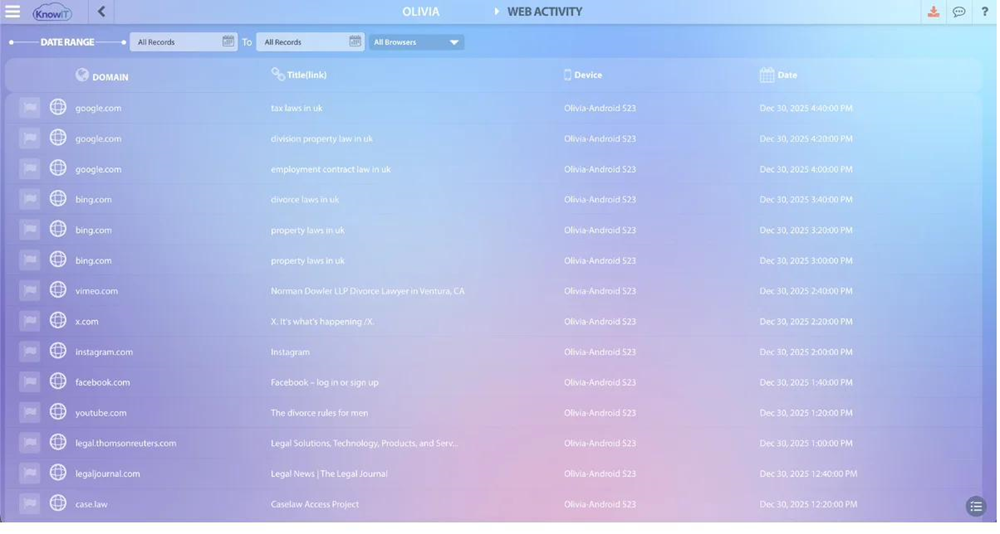
KnowIT’s web activity report, showing tracked browsing activity alongside productivity classification.
Policy Engine & Setup Complexity
| Capability | KnowIT | Teramind |
| Visual rule editor | ❌ | ✅ |
| Regular expression (regex) rule support | ❌ | ✅ |
| Dynamic risk scoring | ❌ | ✅ |
| In-app fraud detection | ❌ | ❌ (Enterprise plan only) |
| Remote desktop control | ❌ | ✅ |
| Network threat & anomaly detection | ✅ | ✅ |
| Insider threat / abusive behavior detection | ✅ | ✅ |
| Pre-built management reports | ✅ | ✅— rule templates |
| Free installation service | ✅ | ❌ |
| License minimum | None | 5 seats, every plan |
Teramind’s rules engine is one of its strongest features. It has a visual, step-by-step editor for building rules, and it supports advanced pattern matching, called regular expressions or “regex.” It also tracks a risk score for each employee that changes based on their behavior.
This is powerful, but it also explains why Teramind is usually set up and managed by an IT or security team, not a business owner working alone.
KnowIT doesn’t try to match this level of detail. It has no regex support, no dynamic risk scoring, and no visual rule builder. Instead, it offers ready-made reports that work right away, with no setup needed. There’s also no minimum number of users, and a free installation service if you’d rather not set it up yourself.
For a business without an IT team, this trade-off usually makes more sense. You get less to configure, in exchange for less configuring to do.
Pricing: What You’ll Actually Pay
| Plan | KnowIT | Teramind |
| Free tier | $0 forever, up to 5 devices, no credit card | Not available |
| Entry-level plan | Not available | Starter: $15/user/mo, 5-seat min = $75/mo |
| DLP only | $14.99/user/mo, Windows only, no minimum | Not available |
| Employee monitoring | $19.99/user/mo, no minimum, Win/Mac/Android | UAM: $30/user/mo, 5-seat min = $150/mo |
| Monitoring + DLP | Complete: $24.99/user/mo, no minimum | DLP: $35/user/mo, 5-seat min = $175/mo |
| Free trial | ✅ — full Complete edition, no credit card | ✅ — no credit card, capped at 5 users |
Prices sourced from official KnowIT and Teramind pricing pages (July 2026), based on month-to-month billing. Teramind requires a 5-seat minimum on every plan; annual billing offers a modest discount over monthly rates on both platforms.
The biggest factor here is Teramind’s five-seat minimum. It applies to every plan, no matter how many people you actually need to monitor.
Here’s an example. A one-person business using KnowIT Complete pays $24.99 a month for full monitoring and DLP. The same business using Teramind’s DLP plan pays $175 a month. That’s because Teramind charges for a minimum of five seats, even if you only need one.
This gap holds even for bigger teams. A five-person team on KnowIT’s Employee Monitoring plan pays $99.95 a month — that’s $19.99 per person. The same team on Teramind’s UAM plan pays $150 a month, or $30 per person. That’s a difference of about $50 a month, or roughly $600 a year, for similar core monitoring.
Teramind’s advantage isn’t price. It’s depth, for the businesses that truly need everything it offers. But if you don’t need these features, you could be paying for tools you’ll never use.
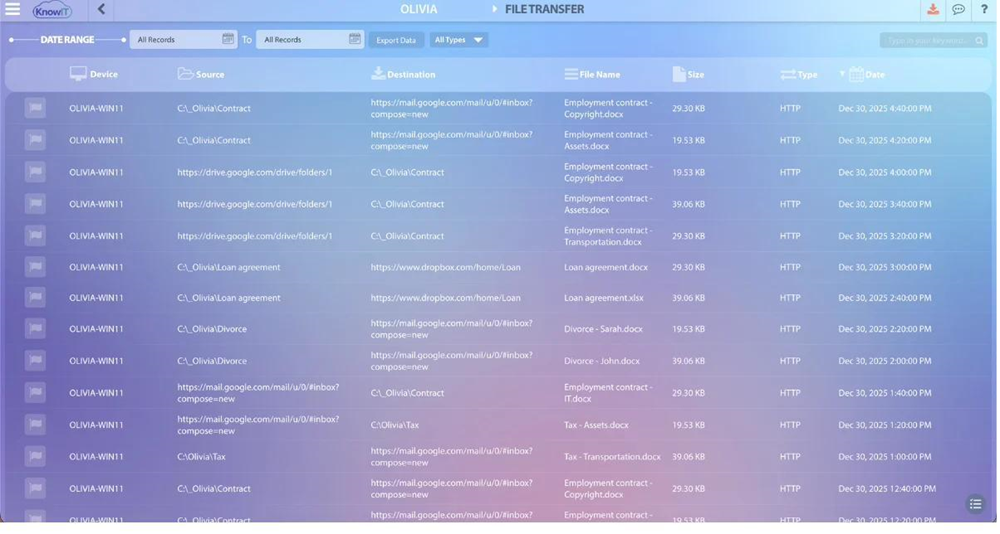
KnowIT’s file transfer report, showing tracked USB, cloud, and network file activity.
Why the Monitoring Gap Costs More Than It Looks Like
Verizon’s 2025 Data Breach Investigations Report looked closely at small and midsize businesses. It found that roughly 60% of data breaches involve a human element — a mistake, a stolen password, or a deliberate act by someone inside the company. This is true no matter the size of the business. It’s the core reason monitoring and DLP tools exist in the first place. The risk isn’t just an enterprise problem.
Here’s a real example of how long this kind of problem can go unnoticed. In March 2025, HR software company Rippling sued a competitor, Deel. Rippling claimed that one of its own employees had secretly been working for Deel.
According to CNBC’s reporting, that employee accessed sales records, customer information, and support requests over several months. Nobody noticed until Rippling began investigating a suspected leak.
Rippling is a large company, not a small business. But the pattern here is a common one: someone with normal access did something unusual that still looked plausible on the surface, and it took a long time for anyone to notice.
This is the exact problem both KnowIT and Teramind are built to solve. Both give you visibility into file access, communication, and data movement while it’s happening — not months later. The real question is which tool gets you there, without going over your budget or asking more of your team than they can manage.
Which Platform Should You Choose?
Choose KnowIT if:
You’re a small or midsize business — a business owner, operations manager, or IT manager — who needs employee monitoring, DLP, or both, without enterprise-level pricing or a five-seat minimum. KnowIT is the only one of the two tools with Android monitoring. It offers DLP on its own, starting at $14.99 per user per month, and includes free installation help if you’d rather not set it up yourself.
Not the right fit if: you need content-based DLP rules, data fingerprinting, continuous video recording, or a fully customizable rules engine with regex support. Those are Teramind’s strengths.
Choose Teramind if:
You’re a larger organization with a dedicated IT or security team. You need the deepest monitoring and DLP tools available — content-based rules, data fingerprinting, dynamic risk scoring, continuous video recording, and SIEM integration. Teramind also includes solid productivity and attendance tracking, so it covers more than just security.
Not the right fit if: you’re a small business without a dedicated IT team, since the setup work will be hard to manage. Also not a fit if you have Android devices that need monitoring, since Teramind has no mobile coverage. And not a fit if you want DLP without paying for a full five-seat monitoring bundle.
Frequently Asked Questions
Does Teramind offer a free trial?
Yes. Teramind offers a free trial directly from its pricing page, with no credit card required, though trial accounts are capped at 5 users. KnowIT also offers a free trial of the full Complete edition, with no credit card required — and it automatically moves you to a permanent free tier if you don’t continue, rather than simply expiring.
Is there a Teramind alternative without a five-seat minimum?
Yes. KnowIT has no license minimum on any plan — you can buy a single license. Teramind requires at least five seats on every plan, including Starter, UAM, and DLP.
Does Teramind support Android device monitoring?
No. Teramind does not offer Android or any other mobile device monitoring, at any plan level. KnowIT supports full Android monitoring, including call recording, SMS and IM monitoring, media capture, and mobile device management, on its Employee Monitoring and Complete plans.
What’s the cheapest way to get both employee monitoring and DLP?
KnowIT Complete costs $24.99 per user per month, with no minimum number of users. A single license covers one person for $24.99 a month. Teramind’s DLP plan costs $35 per user per month, with a five-seat minimum, so its lowest possible cost is $175 a month, no matter how many people you actually monitor.
Can I buy Teramind’s DLP features without also paying for full monitoring?
No. Teramind’s Starter plan includes basic website and application blocking, while its UAM plan adds some file-transfer controls. However, advanced DLP features, such as sensitive-data detection, content-based blocking, and data fingerprinting, require Teramind’s DLP plan, which also includes full employee monitoring and has a five-seat minimum.
KnowIT offers standalone DLP for Windows at just $14.99 per user per month, with no minimum. So if your priority is preventing unauthorized file transfers rather than monitoring employees, you can get the protection you need without paying for a full monitoring suite.
Which platform is easier to set up without an IT team?
KnowIT, by a clear margin. It includes a free installation service if you’d rather not set it up yourself, plus ready-made reports that work with no setup. Teramind’s visual rule editor, regex-based policies, and SIEM integrations are powerful, but they’re usually set up and managed by IT or security staff.
Does KnowIT include productivity and attendance tracking?
Yes. KnowIT includes time and attendance tracking, break time measurement, and productivity scoring on all paid plans, alongside its monitoring and DLP capabilities — so businesses aren’t running a separate tool for workforce reporting.
Is Teramind or KnowIT better suited to regulated industries with complex compliance needs?
Teramind has an edge here. Its content-based DLP rules and data fingerprinting suit organizations with advanced compliance needs, like large healthcare or financial companies. That said, both tools support GDPR, HIPAA, and PCI DSS reporting at a basic level, which covers the needs of most small and midsize businesses.
Final Verdict
Teramind and KnowIT solve the same basic problem: giving you visibility into how employees use company devices and data. But they’re built for two different kinds of buyers.
Teramind is built for organizations with the IT resources to run a highly customizable platform. In exchange, it offers real depth — content-based DLP, data fingerprinting, dynamic risk scoring, and continuous recording.
KnowIT is built for the more common case: a small or midsize business that needs real monitoring and DLP coverage, including Android devices, which Teramind doesn’t cover at all. And it does this without a five-seat minimum, a big setup project, or an enterprise price tag.
The most reliable way to find out which one fits is to try it. KnowIT offers a free trial of the full Complete edition, with no credit card required, and moves you to a permanent free tier if you decide not to continue.