People rarely quit without warning. Before someone hands in their notice, there are usually weeks — sometimes months — of small shifts in their behaviour. They start showing up differently. Their digital activity changes, their engagement dips.
And if you’re paying attention, or have the right tools running in the background, you can often pick up on these signals before the resignation letter lands on your desk.
In this article, we will look at the signs your employee is job hunting, and more importantly, what you can do about it.
But first, let’s look at how common this situation is.
More of Your Team Is Looking Than You Think
Gallup’s State of the Global Workplace found that 51% of employees worldwide are currently watching for or actively seeking a new job. That’s roughly one in two people, at any given moment, with at least one eye on the exit.
When someone does leave, the cost hits hard. Gallup puts the replacement cost of a single employee at 50% to 200% of their annual salary — and that’s before factoring in the disruption to the team, the time it takes a replacement to get up to speed, or the clients who leave with them.
For a small business, losing one key person can set an entire department back by months.
The Part Most Business Owners Don’t See Coming
Job hunting doesn’t just mean an upcoming vacancy. It can also mean your data is walking out the door.
A study commissioned by Symantec and carried out by the Ponemon Institute found that 59% of employees admitted to taking company data when they left, and 67% of those took it straight to their next employer.
Client lists, project files, pricing data, templates — things that took years to build, gone in a few clicks.
The timing matters too. Research from CurrentWare shows that 70% of intellectual property theft happens within the 90 days before an employee’s resignation announcement — not after. The damage is usually done long before you find out someone is leaving.
The GlaxoSmithKline Case
Published case study
Before resigning from GlaxoSmithKline, one of the world’s largest pharmaceutical companies, quality systems lead Denise Brooks used her credentials to access GSK’s Rockville facility on the day she quit.
She had IT staff copy a “wealth” of trade secrets from her old laptop onto a brand-new company computer. In the days before and after her resignation, she also emailed confidential files to her personal account and transferred documents to an external Kingston USB drive.
GSK discovered the unauthorised transfers and took the case to Maryland’s federal court. What makes it instructive is how low-tech it was — a laptop swap, a personal email, a USB drive. No sophisticated hacking.
Just access, intent, and a window of time before anyone noticed.
Full case details: Fierce Pharma — GSK launches trade secrets case against former employee
9 Signs an Employee Is Probably Job Hunting
None of these signs is conclusive on its own. But when several appear together — especially alongside the digital monitoring data covered in the next section — the picture becomes a lot clearer.
1. They’re showing up on job boards
Frequent visits to LinkedIn, Indeed, Glassdoor, or competitor careers pages during working hours are one of the most visible digital signals. A Ringover survey of 1,000 American workers found that updating a LinkedIn profile was the single most common visible indicator of job hunting, cited by 55.9% of respondents. Browsing patterns like this are exactly what internet usage monitoring is built to catch. It’s a small thing, but it’s a consistent one.
2. File activity is spiking outside normal patterns
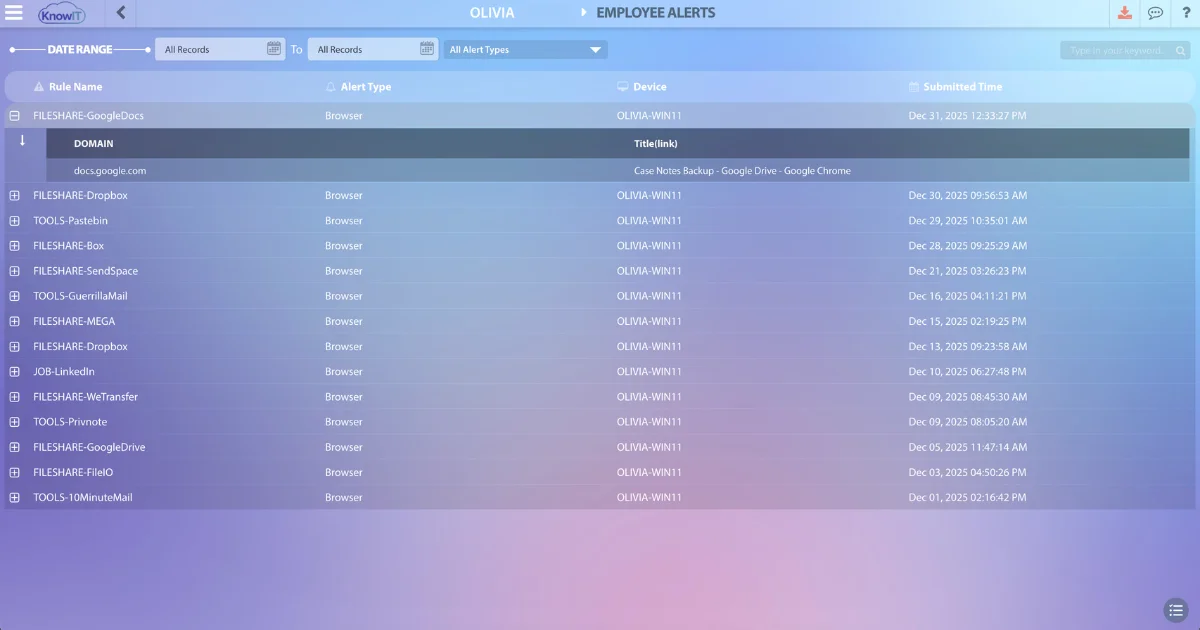
Accessing large batches of documents, downloading client lists, copying files to USB drives, or uploading to personal cloud storage accounts. This is often the sign with the most serious consequences — and the kind of activity that standard IT setups don’t catch until it’s too late.
3. Core work tools are sitting idle
A drop in active usage of the CRM, project management platform, or internal systems — combined with more time on general browsing — tends to track with disengagement. Someone who’s mentally checked out stops investing in the tools they’re planning to leave behind.
4. Their search history is telling
Browser search logs can surface queries like “resignation letter template,” “non-compete clause,” “notice period rules,” or the names of specific recruiters or competitors. These searches tend to cluster with other activity rather than appear in isolation.
5. They’re coming in late, leaving early, or burning through PTO
The same Ringover survey found that turning up late or leaving early was the most common in-office indicator of job hunting, cited by 33.5% of respondents.
Burning through accumulated leave quickly is another flag — people often try to use their PTO before resigning rather than lose it.
These patterns are easier to catch when you’re already tracking employee attendance consistently.6. Personal phone calls are happening more often
Stepping outside for frequent private calls, or spending stretches of time away from their desk on a personal device, can indicate someone fielding calls from recruiters or sitting a phone screen. Managers consistently report noticing this pattern in the lead-up to resignations.
7. They’ve started dressing differently
An employee who has always been casual but starts turning up in a blazer on random Tuesdays might be heading to an interview before or after work. Lattice cites this as one of the most commonly observed visible signals that managers notice in the weeks before a resignation.
8. Their output has dropped, and they’ve gone quiet
Missed deadlines, minimal contributions in meetings, a general shift toward doing the bare minimum. Monitoring data — active vs. idle time, application usage — gives you something objective to work with rather than relying purely on gut feel.
9. They’ve pulled back from the team
Less internal messaging, shorter replies, opting out of activities they used to participate in. The Ringover survey flagged a decline in Slack or Teams communication as a notable digital tell in remote and hybrid work environments.
What Employers Can Do About Detecting Job Hunting
Employee monitoring software is one of the most effective ways to surface job-hunting signals early. These tools give you visibility into the digital activity that would otherwise go unnoticed — websites visited, files moved, productivity patterns — without having to rely on gut feel or secondhand reports.
KnowIT is one such solution. Here’s what the relevant monitoring categories look like inside the platform.
Web browsing activity
KnowIT logs every site visited by each user — URL, time spent, and timestamp. Job boards and professional networking platforms appear in the browsing report like any other site, making it straightforward to see whether visits are isolated or part of a recurring pattern across multiple days.
Search terms
KnowIT captures browser search queries as they happen. This gives visibility into what employees are actively looking up — including job-related searches, competitor names, or queries like “resignation notice period” that would be hard to spot any other way.
File transfers and modifications
Every file operation is logged: uploads, downloads, copies to USB, transfers to cloud storage. When an employee suddenly accesses a large volume of files outside their usual pattern, it shows up here with the file names, destination, and exact timestamps.
Keystroke logging
Keystrokes are captured across applications and browsers. This can surface resignation-related language, messages referencing other employers, or content consistent with a job application — flagging it in context so you can decide whether it warrants a closer look.
Productivity and attendance
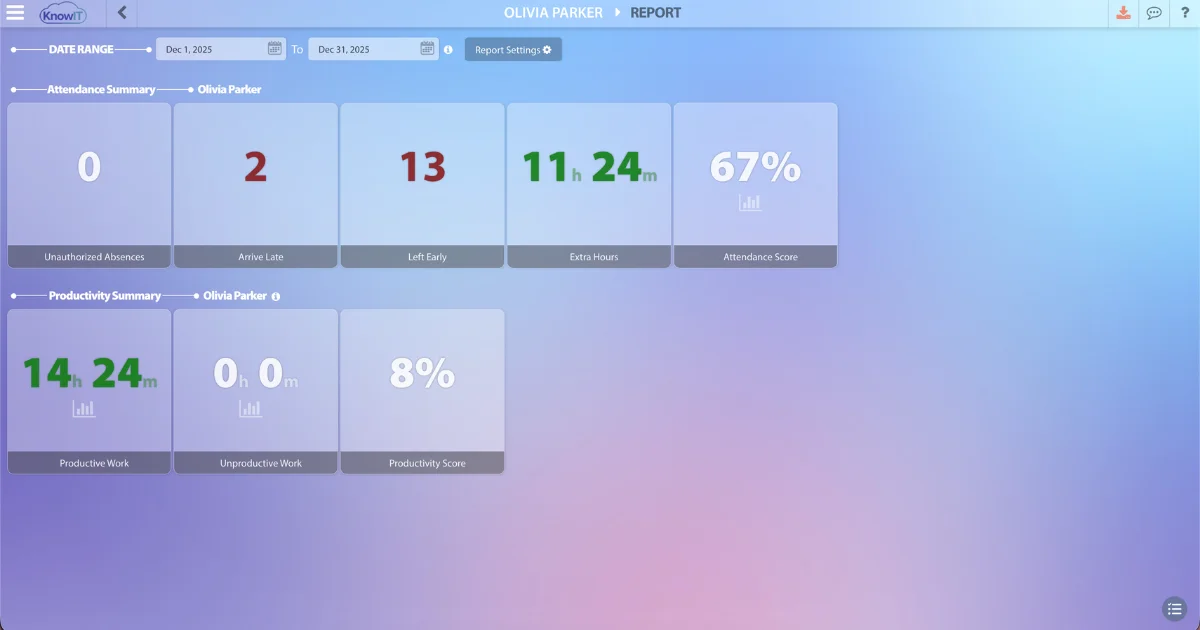
KnowIT tracks active versus idle time against your configured work schedules. A sustained drop in productive output, or changes in how consistently someone is logging on and off, shows up in the productivity and attendance reports across any date range you choose.
On monitoring and legal compliance
Monitoring on company devices and networks is generally permissible in most jurisdictions, but the specifics vary by country and region. Employees should be informed of what is monitored before monitoring begins — both because it’s often a legal requirement and because transparency tends to be a deterrent on its own.
Check with your legal advisor and make sure your monitoring policy is documented and included in employment agreements or onboarding materials.
Common Questions
Can you legally monitor whether an employee is job hunting?
In most jurisdictions, monitoring activity on company-owned devices and networks is permitted — as long as employees are informed in advance. The details depend on where your business operates, so confirm with a local legal advisor and ensure your policy is documented and communicated clearly.
What if an employee is careful and uses their personal phone?
Some employees are cautious about using company devices for job searching. Even so, broader behavioural shifts — productivity drops, attendance changes, file activity, communication patterns — tend to show up regardless of what device they use for the search itself.
What do I do if the signals are there?
The monitoring data should inform a private, constructive conversation — not a confrontation. In many cases, catching the signs early opens a window to address whatever is driving the dissatisfaction before a decision is made. Lattice recommends asking open questions in a one-on-one about how the person is finding their role and what would make it better, rather than asking directly whether they’re looking elsewhere.
Stop Finding Out After the Fact
Most business owners find out an employee is leaving when the resignation letter arrives. By that point, the damage — the lost knowledge, the disrupted team, the data that may have already left — is already done.
KnowIT gives you visibility into the patterns that typically precede a departure: browsing activity, file transfers, productivity trends, and more — all in one platform.
See how KnowIT works — start your free trial.
![KnowIT vs Teramind: Full Comparison for SMBs [2026]](https://blog.digitalendpoint.com/wp-content/uploads/2026/07/KnowIT-vs-Teramind.webp)