TL;DR
- Manual attendance tracking — timesheets, sign-in sheets, honor systems — exposes SMBs to time theft, buddy punching, and payroll errors.
- Employee monitoring software records attendance automatically based on device login and logoff activity, with no hardware or HR integrations required.
- Key features to look for: passive capture, schedule adherence tracking, break time visibility, automated reporting, and low setup overhead.
- KnowIT covers all of this as part of its core monitoring suite — no add-ons needed — and runs on Windows, Mac, and Android.
If you manage a small or mid-sized business, you probably already know that attendance problems are expensive. What you might not realize is just how expensive. According to the CDC Foundation, productivity losses linked to absenteeism cost U.S. employers $225.8 billion annually — roughly $1,685 per employee.And that figure only captures direct costs. Factor in overtime to cover absent workers, administrative time, and the knock-on effect on team output, and the real number climbs considerably higher.
The harder problem for most SMBs isn’t understanding that attendance matters — it’s actually tracking it accurately.
This article breaks down why manual systems fall short, what automated tracking looks like in practice, and how employee monitoring software handles this without requiring a dedicated HR team or IT infrastructure.
Why Manual Attendance Tracking Falls Short
Small businesses are disproportionately exposed to attendance problems because they rarely have dedicated HR staff to enforce policies. A company with 20 employees might have one person handling payroll, compliance, and HR — meaning attendance discrepancies often go unnoticed until they become a pattern.

The most common failure points are:
Buddy punching
An employee asks a coworker to clock in on their behalf. A 2017 survey of 1,000 employees found that 16% admitted to doing this for a colleague — adding up to an estimated $373 million in annual payroll losses across the U.S.
Time rounding and inflation
Employees round up their start and end times. On its own, 10 minutes here and there seems trivial. Across a 15-person team over a year, it compounds into meaningful payroll waste.
No break visibility
Most manual systems track when someone clocks in and out, but not how long their lunch ran or how many times they stepped away mid-shift.
No schedule enforcement
Even if you have defined work hours, there’s typically no automated way to flag when someone consistently starts late or leaves early.
A sudden shift in this pattern could be a sign of job hunting — worth keeping in mind when something looks off.
Gaps in remote visibility
For distributed or work-from-home teams, there’s often no reliable way to confirm when someone was actually at their desk versus just “online.”
If that’s a recurring problem for your team, our guide on how to tell if a remote employee is working or just idle walks through the signals worth checking.
What Automated Attendance Tracking Looks Like
Automated attendance tracking ties records to actual device activity rather than self-reported check-ins. The core mechanics are straightforward: when an employee logs into their work device, the session starts.When they log off, it ends. Everything in between — idle time, breaks, active periods — is measured automatically.
Beyond that basic record, most employee monitoring tools built for attendance also cover:
Schedule adherence
Admins set expected start and end times for individuals or the whole team, and the software flags deviations automatically.
Break time measurement
Periods of inactivity during work hours are recorded separately, so managers see active time versus downtime — not just total hours logged.
Holiday accounting
Approved company holidays are built into the attendance calendar so they don’t distort records or require manual corrections each month.
Scheduled reporting
Attendance reports can be generated automatically on a daily, weekly, or monthly basis and delivered directly to managers or HR — no manual assembly at pay period end.
The result is an attendance record that reflects what actually happened, anchored to real device data rather than what employees submitted.
A Closer Look at Attendance Gaps in a Distributed Team
Consider a mid-sized logistics company with 30 office and field employees spread across two locations. The business ran on a mix of timesheets and an honor-based check-in process, with payroll processed weekly based on submitted hours.
After noticing overtime costs were consistently higher than expected — with no obvious increase in workload — the operations manager introduced employee monitoring software.
Within the first month, the data surfaced patterns that had been invisible before: a handful of employees were clocking in 20 to 30 minutes late on a regular basis, break durations were running well over the allotted time for certain team members, and two employees had submitted hours on days their devices showed no login activity at all.
None of it was necessarily deliberate — but the aggregate impact on payroll was significant. More importantly, the manager now had accurate data to have direct, evidence-based conversations rather than relying on gut feeling or guesswork.
That shift alone, from suspicion to documented fact, tends to be what changes behaviour.
How Employee Monitoring Software Handles Attendance Tracking
Employee monitoring software approaches attendance differently from standalone HR tools. Rather than relying on employees to clock in, it builds attendance records from device activity automatically — login and logoff events, idle periods, active time during scheduled hours.
Most platforms designed for SMBs include attendance dashboards, schedule configuration, and automated reporting without requiring integration with a separate timekeeping system.
KnowIT is one option that covers attendance tracking as part of its core monitoring suite. Here’s what those features look like inside the platform:
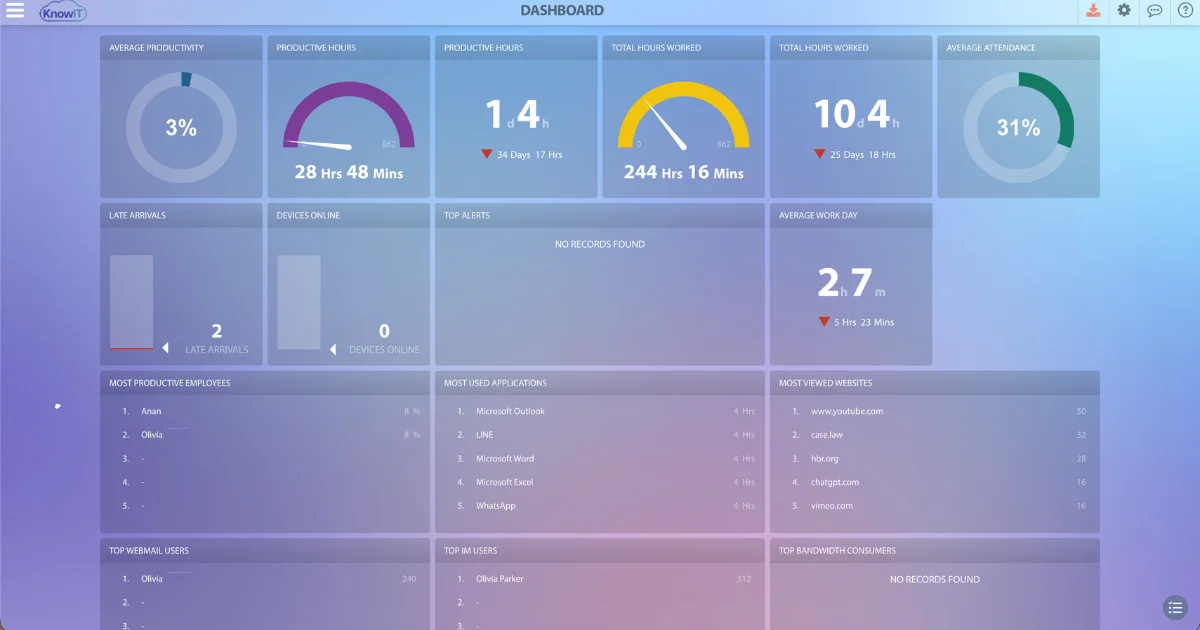
Attendance dashboard
Managers get a normalized attendance score for every employee, updated automatically based on device login and logoff data. Filterable by individual, department, or the full organization.
Work schedule configuration
Company-wide schedules or per-employee schedules can be set independently — useful for staggered shifts, part-timers, or employees across time zones.
Break time tracking
Idle periods during scheduled hours are captured separately, giving managers a breakdown of active versus inactive time throughout the day.
Holiday accounting
Approved company holidays are factored into the attendance record automatically, keeping reports accurate without manual adjustments.
Automatic attendance reports
Reports can be scheduled for delivery to managers or individual employees — giving people visibility into their own records and reducing disputes before they start.
Normalized attendance scores
Each employee gets a standardized score, making it straightforward to compare attendance across roles or departments without digging through raw data.
KnowIT runs on Windows and Mac. For businesses with field staff or employees on company Android phones, it also extends to Android devices — covering office and mobile workforces from a single platform.
What to Look for in an Attendance Tracking Tool
If you’re evaluating options, a few things separate a reliable attendance tracking solution from a basic time-logging tool:
Passive capture
Any tool that requires employees to clock themselves in carries the same vulnerabilities as a manual system. Look for software that records attendance automatically based on device activity.
Schedule adherence, not just hours logged
Knowing an employee worked eight hours is less useful than knowing whether those hours aligned with their scheduled shift.
Break time visibility
Total hours don’t tell the full story. Active time during scheduled hours is a more accurate measure of actual attendance.
Automated reporting
Attendance data is only useful if it’s easy to access. Scheduled automatic reports save administrative time and make payroll reconciliation faster.
Low setup overhead
For SMBs without a dedicated IT team, deployment complexity is a real barrier. Look for something that installs quickly and doesn’t need ongoing technical maintenance.
Bottom Line
Attendance data is a starting point, not the full picture — pair it with our guide on how to find out who your most productive employees are for a fuller view of performance.
Manual attendance tracking works until it doesn’t. Timesheets are easy to manipulate, buddy punching is hard to catch without technology, and remote work makes self-reporting even less reliable.Tying attendance records to actual device activity closes those gaps — giving managers accurate data, reducing payroll errors, and making attendance conversations straightforward.
KnowIT covers this as part of its core monitoring suite, with no add-ons or integrations required. If you want to see how it works in practice, you can start a free trial — no credit card needed, and the platform rolls to a free plan automatically if you decide not to continue.
![KnowIT vs Teramind: Full Comparison for SMBs [2026]](https://blog.digitalendpoint.com/wp-content/uploads/2026/07/KnowIT-vs-Teramind.webp)