ActivTrak does productivity and attendance tracking well. But for most businesses, that’s not the only thing they need.
Buyers today are weighing more than time-in-app. Insider data theft, accidental leaks, departing employees, mobile workforces, and AI tools quietly exfiltrating data are now standard line items on the evaluation checklist — and they fall outside the scope of pure productivity tools.
ActivTrak only measures productivity, attendance, and screenshots.
This guide lists the strongest ActivTrak alternatives in 2026, compares features and pricing side by side, and shows where KnowIT fits for teams that need productivity tracking plus real employee monitoring and Data Loss Prevention (DLP).
Quick Answer
| If you need… | Best fit |
| Productivity & attendance only | ActivTrak, Hubstaff, Time Doctor, Insightful, DeskTime |
| Productivity + real employee monitoring | KnowIT, Teramind, Veriato (depending on your needs) |
| Productivity + monitoring + DLP in one platform | KnowIT |
| Enterprise-grade monitoring with seat minimums | Teramind |
| Mobile / Android device monitoring | KnowIT (others on this list don’t support it) |
Why People Search for ActivTrak Alternatives
Most ActivTrak alternative searches start with a productivity question and end with a security one. The reason is in the numbers — insider incidents are now one of the most expensive and least-contained categories of data breach.
Productivity dashboards don’t address this risk category, which is why broader monitoring and DLP have moved up the buying list.
Key 2025 figures:
- $17.4M — average annual cost of insider incidents per organization (Ponemon 2025, up from $16.2M in 2023)
- 81 days — average time to detect and contain an insider incident
- $18.7M — average cost of incidents that take 91+ days to contain
- 45% — share of data breaches involving insiders (Ponemon State of File Security 2025)
- 38% / 33% / 30% — share of breaches involving internal actors in Education / Public Sector / Healthcare (Verizon DBIR 2025)
Sources: Ponemon Institute / DTEX 2025 · Ponemon / Kiteworks 2025 · Verizon DBIR 2025
The implication for buyers: if your monitoring tool can’t see communications, file activity, or USB transfers, it isn’t covering the channels where most insider incidents actually happen.
ActivTrak: Strengths and Limitations
ActivTrak is built as a workforce analytics platform. Its strengths are concentrated in productivity scoring, time-on-task analysis, and HR-adjacent insights like burnout and capacity planning.
Where it lags is in the deeper monitoring and data protection capabilities that come standard in security-focused tools.
Strengths
- Workforce analytics and productivity scoring
- Productivity goal tracking and benchmarking
- Burnout detection and workload balancing
- Capacity and headcount planning
- BI integrations (Power BI, Tableau, Looker Studio)
- HRIS integrations
- AI productivity coaching and AI tool usage tracking
Limitations
- No keystroke logging
- No email monitoring (webmail or client)
- No instant messaging monitoring
- No desktop VoIP call recording or logs
- No print tracking or browser bookmarks tracking
- No file transfer tracking or blocking
- No USB tracking or blocking
- No web upload/download tracking
- No application access restrictions
- No network threat detection or packet analysis
- No Android monitoring or MDM
- Screenshots require the paid Screen Details add-on
Best ActivTrak Alternatives
The seven tools below are the ActivTrak competitors most commonly shortlisted by SMBs and mid-market buyers. They fall into three groups: productivity-only tools (Hubstaff, Time Doctor, Insightful, DeskTime), security-led tools (Veriato), and platforms that combine productivity tracking with deeper monitoring and DLP (KnowIT, Teramind).
| Tool | Best for | Productivity tracking | Employee monitoring | DLP | Mobile/ Android |
| KnowIT | Productivity + monitoring + DLP in one platform | Yes | Full | Full | Yes |
| Teramind | Enterprise with seat minimums | Yes | Full | Yes | No |
| Veriato | Security-led insider threat focus | Limited | Full | Yes | No |
| Hubstaff | Time tracking, field teams (GPS) | Yes | Limited | No | Limited |
| Time Doctor | Time tracking with screenshots | Yes | Limited | No | No |
| Insightful | Workforce analytics (ActivTrak-like) | Yes | Limited | No | No |
| DeskTime | Simple productivity tracking | Yes | Limited | No | No |
1. KnowIT
KnowIT and ActivTrak overlap heavily on productivity and attendance, but diverge sharply on monitoring depth and data protection. The tables below break the comparison into seven categories.
Compared: KnowIT Complete vs ActivTrak Professional + Screen Details + AI Insights (the most feature-complete configuration of each).
Productivity & Attendance
| Feature | KnowIT | ActivTrak |
| Time tracking | ✅ | ✅ |
| Attendance tracking | ✅ | ✅ |
| Schedule adherence | ✅ | ✅ |
| Productivity measurement & scoring | ✅ | ✅ |
| Productivity reports | ✅ | ✅ |
| AI productivity coaching | ✅ | ✅ |
| Hybrid/remote work analytics | ✅ | ✅ |
| Productivity by location | ✅ | ✅ |
| Contractor billing reconciliation | ✅ | ✅ |
| Productivity goal tracking | ❌ | ✅ |
| Productivity benchmarking | ❌ | ✅ |
| Personal productivity insights | ❌ | ✅ |
| Workload balancing | ❌ | ✅ |
| Burnout detection | ❌ | ✅ |
| Workforce utilization analytics | ❌ | ✅ |
| Capacity & headcount planning | ❌ | ✅ |
Employee Monitoring
| Feature | KnowIT | ActivTrak |
| Screen recording / live view | ✅ | ✅ (add-on) |
| Screenshot capture | ✅ | ✅ (add-on) |
| Web browsing activity | ✅ | ✅ |
| Application usage tracking | ✅ | ✅ |
| Keystroke logging | ✅ | ❌ |
| Email monitoring (webmail & client) | ✅ | ❌ |
| Instant messaging monitoring | ✅ | ❌ |
| Desktop VoIP call recording | ✅ | ❌ |
| Desktop VoIP call logs | ✅ | ❌ |
| Search terms & videos watched | ✅ | ❌ |
| Browser bookmarks tracking | ✅ | ❌ |
| Print tracking | ✅ | ❌ |
| Installed applications audit trail | ✅ | ❌ |
| Social media monitoring | ✅ | Limited |
Data Loss Prevention (DLP)
| Feature | KnowIT | ActivTrak |
| File transfer tracking | ✅ | ❌ |
| File transfer blocking | ✅ | ❌ |
| File modification tracking | ✅ | ❌ |
| File modification alerts | ✅ | ❌ |
| USB file tracking | ✅ | ❌ |
| USB file blocking | ✅ | ❌ |
| Web upload/download tracking | ✅ | ❌ |
| Application access restrictions | ✅ | ❌ |
| Peripheral management | ✅ | ❌ |
Security & Threat Detection
| Feature | KnowIT | ActivTrak |
| Network threat detection | ✅ | ❌ |
| Suspicious port tracking | ✅ | ❌ |
| Network packet analysis | ✅ | ❌ |
| Insider threat detection | ✅ | Limited |
| AI tool usage tracking | ✅ | ✅ |
| AI compliance monitoring | ✅ | ✅ |
| Compliance alerts/alarms | ✅ | ✅ |
Device & Endpoint Management
| Feature | KnowIT | ActivTrak |
| Block applications | ✅ | Limited |
| Block websites | ✅ | Limited |
| Peripheral tracking | ✅ | ❌ |
| Device geolocation | ✅ | ❌ |
| Geofencing/alert zones | ✅ | ❌ |
| Remote device lock/wipe | ✅ | ❌ |
| Disable device camera | ✅ | ❌ |
Mobile Device Monitoring
| Feature | KnowIT | ActivTrak |
| Android monitoring | ✅ | ❌ |
| Android call recording | ✅ | ❌ |
| Android SMS & MMS | ✅ | ❌ |
| Android IM & email | ✅ | ❌ |
| Android media capture | ✅ | ❌ |
| Android contacts/calendar/notes | ✅ | ❌ |
| Mobile Device Management (MDM) | ✅ | ❌ |
For a closer look at how Android phone monitoring works in practice, see our complete Android monitoring guide.
Analytics & Integrations
| Feature | KnowIT | ActivTrak |
| Pre-built reports | ✅ | ✅ |
| Executive dashboards | ✅ | ✅ |
| Custom dashboards | ✅ | ✅ |
| BI integrations | Limited | ✅ |
| HRIS integrations | Limited | ✅ |
| Power BI / Tableau / Looker | ❌ | ✅ |
| Teams / Slack / Jira | Limited | ✅ |
Pricing Comparison
KnowIT publishes flat per-user pricing across four tiers with no minimum seat counts.
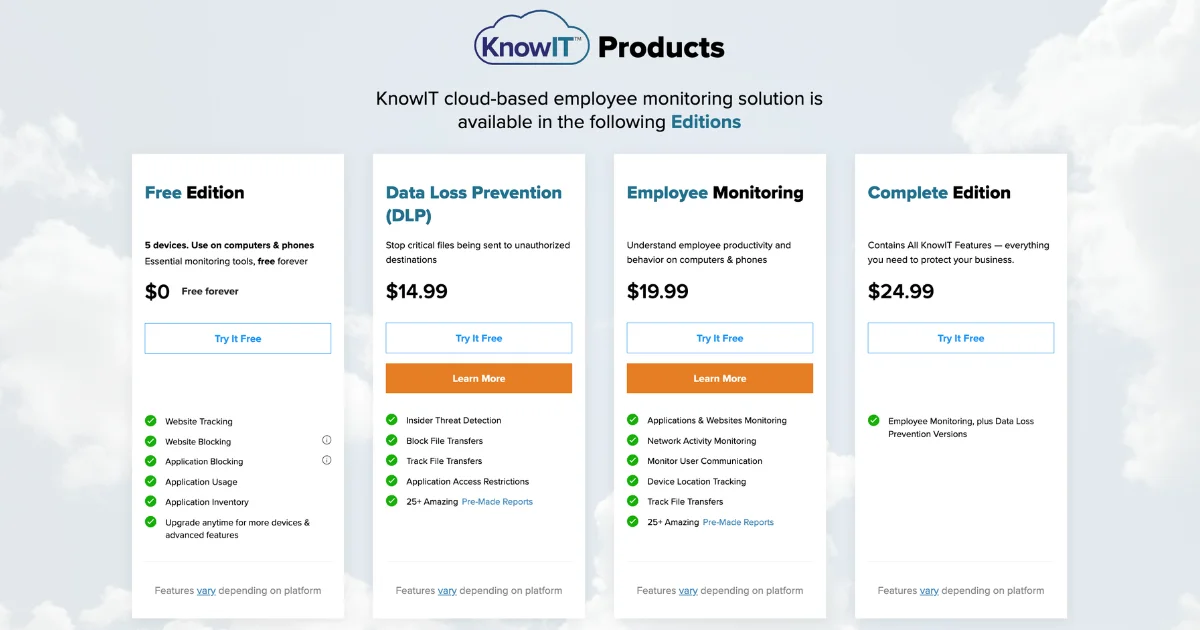
ActivTrak’s most feature-complete plan combines its Professional tier with paid add-ons such as Screen Details (screenshots) and AI Insights — the all-in monthly cost lands higher than the advertised base price.

Here’s a comparison of the different plans offered by KnowIT and ActivTrak:
| Plan | KnowIT | ActivTrak |
| Free | $0 — up to 5 devices, no card | $0 — up to 3 users, basic only |
| Productivity/attendance only | None (lowest paid plan is EM at $19.99) | Free or Essentials (~$10/user/mo) |
| Standalone DLP | $14.99/user/mo, no minimum | Not available |
| Full employee monitoring | $19.99/user/mo, no minimum | No true equivalent. Closest is Professional ($19) + Screen Details add-on ($2) — ~$21/user/mo, but no keystroke logging, email, IM, or VoIP monitoring |
| Monitoring + DLP | $24.99/user/mo, no minimum | Not available |
If you’re weighing KnowIT against Teramind specifically, our full ActivTrak vs Teramind comparison breaks down all three platforms side by side.
2. Teramind
Teramind is an enterprise-grade user activity monitoring and insider risk management platform, and a strong alternative for organizations that find ActivTrak too limited on the security front.
While ActivTrak focuses on productivity analytics, Teramind combines deep employee monitoring, behavioral analytics, and Data Loss Prevention in one platform. It’s designed for security-heavy environments like finance, healthcare, legal, and government, where compliance and insider threat prevention are top priorities.
Features
- Full user activity monitoring: keystrokes, screen recording, email, instant messaging, file transfers, and social media (feature availability varies by plan)
- Behavioral analytics with AI-powered anomaly detection, dynamic risk scoring, and insider threat management workflows
- Full DLP with content-based rules, sensitive data detection, automated blocking, and 200 pre-packaged DLP rules (DLP plan and above)
Limitations
- 5-seat minimum across all plans
- Steeper learning curve — advanced configuration requires IT involvement, unlike KnowIT
- No mobile monitoring
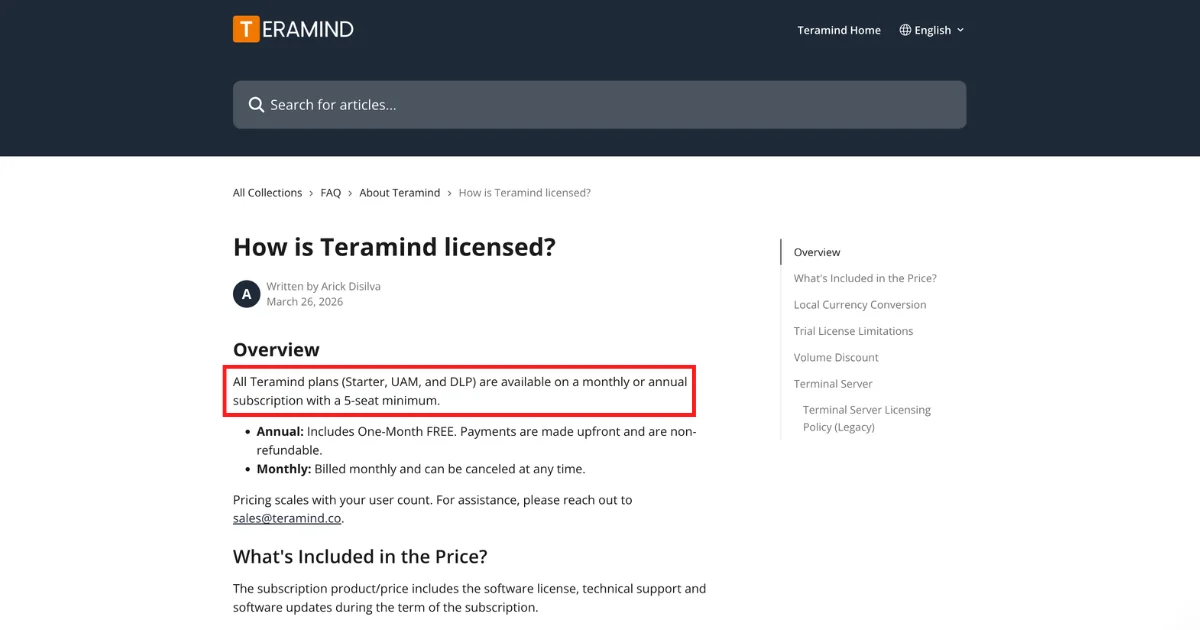
Pricing
- Starter: $15/seat/month
- UAM: $30/seat/month
- DLP: $35/seat/month
- Enterprise: Custom pricing
3. Veriato
Veriato is one of the most established employee monitoring vendors, with over 25 years in the space, and a capable alternative for organizations that need more behavioral intelligence than ActivTrak provides.
It offers two products: Veriato UAM for user activity monitoring, and Veriato IRM, an AI-powered insider risk management platform that uses natural language processing and sentiment analysis to detect behavioral shifts before incidents occur. It supports Windows, Mac, Chrome, and Android.
Features
- Comprehensive activity monitoring across email, chat, websites, apps, files, keystrokes, and screenshots
- AI-powered risk scoring, user behavior baselining, and sentiment analysis for early insider risk detection (IRM only)
- Sensitive data detection and redaction, website blocking, and O365 integration
Limitations
- No mobile support
- IRM pricing is not publicly listed — requires a custom quote
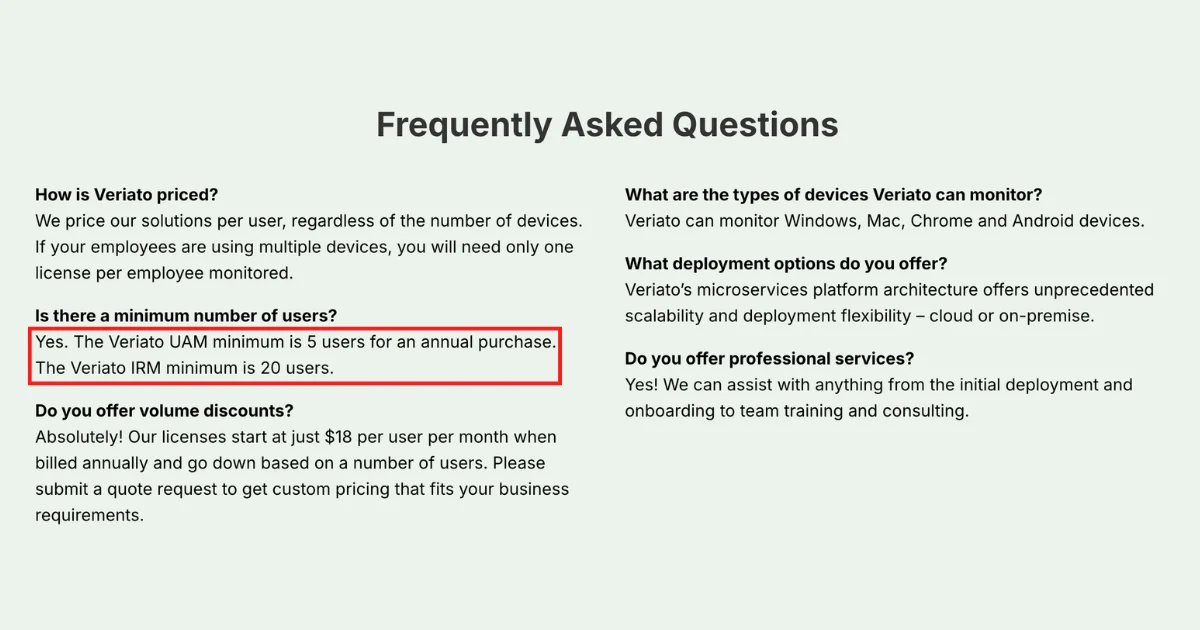
- UAM minimum is 5 users (annual) or 10 users (monthly); IRM minimum is 20 users
Pricing
- Veriato UAM: $18/user/month (billed annually); volume discounts available
- Veriato IRM: Custom pricing — contact sales
4. Hubstaff
Hubstaff is a time tracking and workforce management platform used by 112,000+ organizations. It’s built primarily for remote teams and field service businesses that need accurate time records, GPS tracking, and payroll integration.
It is not a security or DLP tool — monitoring depth is limited to time, activity levels, and screenshots.
Features
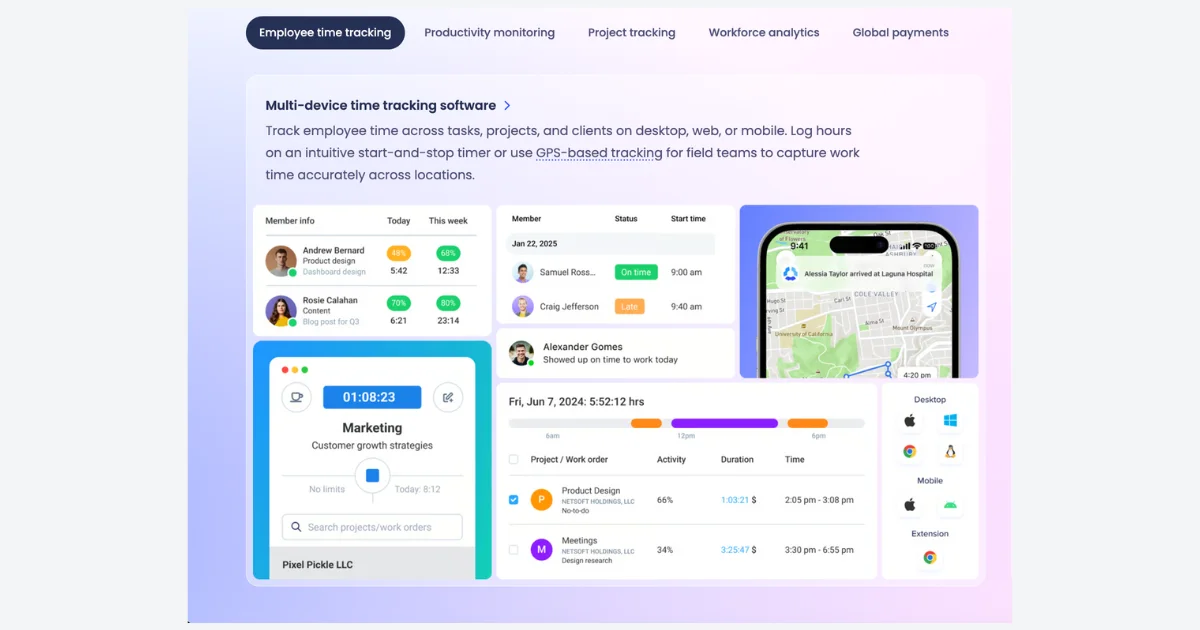
- Time tracking across desktop (Windows, Mac, Linux), browser, and mobile (iOS, Android), with GPS tracking and geofencing for field teams
- App and URL tracking with activity scoring, screenshots, and idle time detection
- Scheduling, payroll integration, invoicing, and project budgeting with 35+ integrations
Limitations
- No keystroke logging, email monitoring, IM monitoring, or DLP of any kind
- Activity scoring based on mouse/keyboard input may not accurately reflect knowledge worker productivity
- No permanently free plan — 14-day trial only; 2-seat minimum on all paid plans
- No mobile support
Pricing
- Starter: $7/seat/month
- Grow: $9/seat/month
- Team: $12/seat/month
- Enterprise: $25/seat/month (billed annually)
5. Time Doctor
Time Doctor is a time tracking and lightweight employee monitoring platform and a straightforward alternative to ActivTrak for remote teams, BPOs, and agencies that need transparent proof of work over deep analytics.
Unlike ActivTrak’s management-facing dashboards, Time Doctor takes a transparency-first approach — employees can view and delete their own screenshot captures. It’s a good fit for distributed teams that need basic productivity accountability, but have no security or DLP features.
Features
- Automatic time tracking with offline support, app and URL tracking, and distraction alerts when employees visit non-work sites
- Screenshots at configurable intervals, visible to employees (employees can delete their own captures)
- Project and task tracking with client billing, invoicing, and payroll integration across 60+ integrations
Limitations
- No keystroke logging, email or IM monitoring, DLP, file tracking, or GPS
- Idle time detection has reported accuracy issues when there is no mouse/keyboard activity, despite legitimate work
- Cloud only — no on-premises deployment; no mobile phone support
Pricing
- Basic: $8/user/month
- Standard: $14/user/month
- Premium: $20/user/month
- Enterprise: Custom pricing
6. Insightful
Insightful is a workforce analytics and productivity monitoring platform that helps organizations understand how work gets done and optimize it. It offers automatic activity tracking, productivity scoring, project-based time tracking, and role-based dashboards.
It’s a good fit for remote-first teams, BPOs, and IT departments — but has no keystroke logging, communication monitoring, or mobile device support.
Features
- Automatic app and URL tracking with productivity scoring, real-time team overview, attendance management, and shift scheduling
- Project and task time tracking with capacity analysis, workload balancing, and hybrid work location insights
- HRIS and project management integrations; security add-ons available for insider threat detection and audit logs
Limitations
- No keystroke logging, email monitoring, IM monitoring, or mobile/Android monitoring
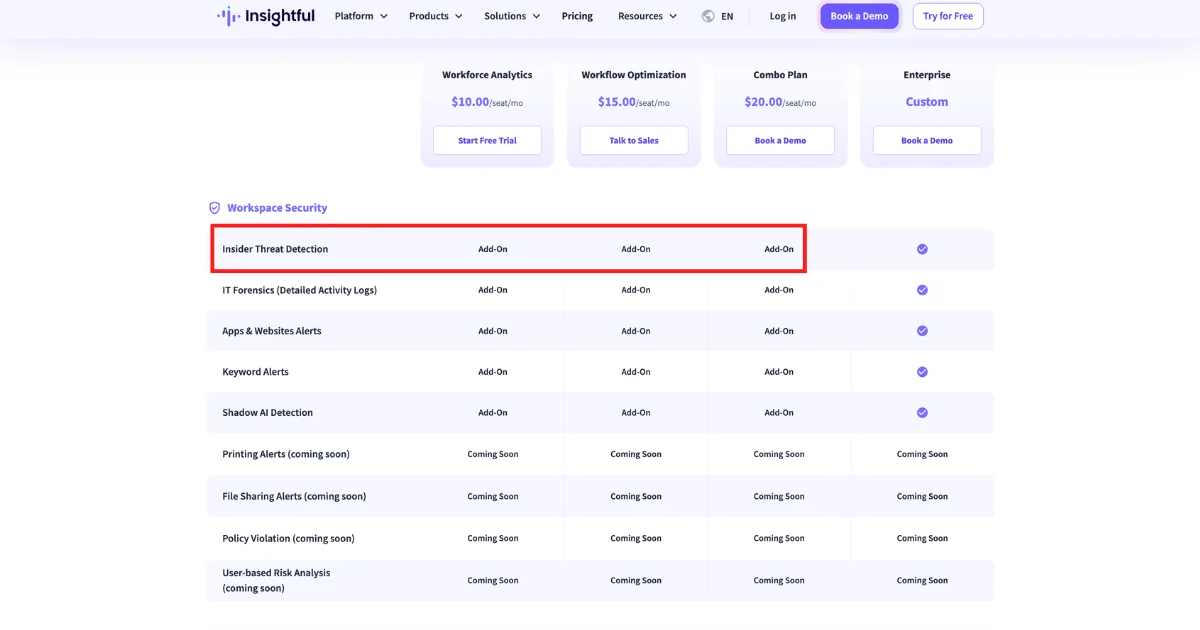
- Security features (insider threat detection, file sharing alerts, policy violation alerts) are paid add-ons or marked “coming soon”
- On-premises deployment requires a minimum of 250 users
Pricing
- Workforce Analytics: $10/seat/month
- Workflow Optimization (Beta): $15/seat/month
- Combo Plan: $20/seat/month
- Enterprise: Custom pricing
- Workspace Security add-on: +$4/seat/month
7. DeskTime
DeskTime is a lightweight automatic time tracking and productivity tool built for small and medium-sized teams that want simple, no-fuss oversight. While ActivTrak offers sophisticated workforce analytics and AI-powered insights, DeskTime strips things back to the essentials — automatic app and website tracking, productivity scores, and project time — without the complexity or price tag.
It is not built for security, DLP, or deeper employee oversight.
Features
- Fully automatic time tracking on Windows, Mac, Linux, iOS, and Android, with app and URL tracking, document title tracking, and productivity classification
- Project time tracking, shift scheduling, absence calendar, and attendance management
- Optional screenshots (Premium plan only), Private Time feature so employees can pause tracking, and AI-powered daily summaries
Limitations
- No keystroke logging, email monitoring, IM monitoring, DLP, file tracking, or GPS
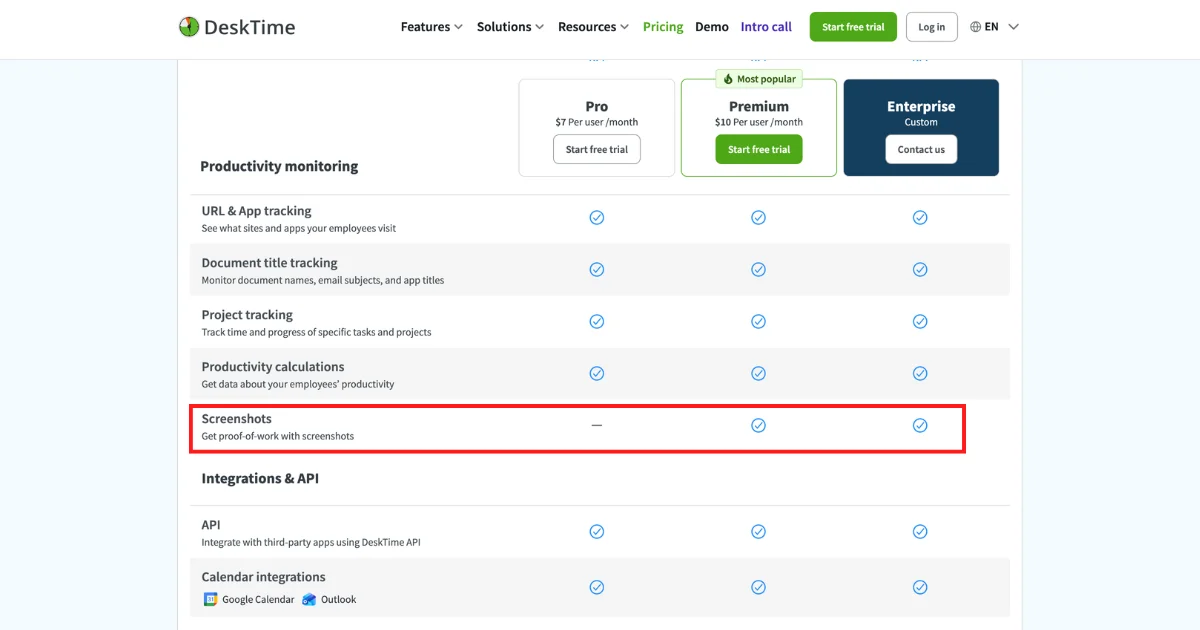
- Screenshots are only available on the Premium plan — not included in Pro
- Cannot block apps or websites — observational only
Pricing
- Pro: $7/user/month
- Premium: $10/user/month
- Enterprise: Custom pricing (200+ users)
Who Should Choose What
The right tool depends on which categories of risk and visibility are on your requirements list. The simplest test: list your top five requirements. If they’re all productivity-focused, ActivTrak or a lighter alternative will likely fit.
If even one touches insider risk, file activity, USB controls, communications, or mobile devices, look at KnowIT or Teramind.
Choose ActivTrak if you…
- Only need productivity analytics and workforce optimization
- Need burnout detection, capacity planning, or workload balancing specifically
- Rely on BI tools (Power BI, Tableau, Looker Studio)
- Have a fully desktop-based workforce
- Don’t need DLP, communication monitoring, or insider threat controls
Choose KnowIT if you…
- Need productivity tracking and real employee monitoring
- Need DLP without buying a second product
- Issue Android devices or have field/mobile staff
- Want insider threat detection, USB controls, or file activity tracking
- Are an SMB and want transparent pricing with no seat minimums
- Want a free trial of the full product with no credit card
Choose Teramind if you…
- Are a larger or compliance-heavy organization
- Can meet seat minimums and want enterprise-grade automation
Choose Hubstaff / Time Doctor / Insightful / DeskTime if you…
- Only need time tracking and basic productivity monitoring
- Want the cheapest, simplest option
Try KnowIT Complete Free for 14 Days
The most efficient way to decide whether you need monitoring and DLP beyond productivity tracking is to test the full feature set on your own environment.
- 14 days of full access to every KnowIT feature — monitoring, DLP, Android
- No credit card required to start
- No commitment — at the end of the trial, if you don’t pick a plan, you’re automatically moved to the forever-free plan (up to 5 devices)
- No cancellation hassle — you’re never charged unless you choose to upgrade
Start your free KnowIT Complete trial
Frequently Asked Questions
Q: What are the best ActivTrak alternatives in 2026?
A: KnowIT (productivity + monitoring + DLP), Teramind (enterprise), Veriato (security-led), Hubstaff / Time Doctor / Insightful / DeskTime (productivity only).
Q: Does ActivTrak offer DLP?
A: No. ActivTrak is a productivity and workforce analytics platform. No file transfer blocking, USB blocking, or file modification controls.
Q: Can ActivTrak monitor Android devices?
A: No. ActivTrak does not support Android monitoring, call recording, SMS monitoring, or MDM. KnowIT does.
Q: What monitoring features does KnowIT have that ActivTrak doesn’t?
A: Keystroke logging, email monitoring (webmail + client), IM monitoring, desktop VoIP call recording and logs, search terms and videos watched, browser bookmarks, print tracking, installed apps audit trail, application access restrictions, and full Android monitoring with MDM.
Q: How much do insider incidents cost?
A: $17.4M per organization per year on average (Ponemon 2025). 45% of breaches involve insiders.
Q: Is employee monitoring legal?
A: Yes, in most jurisdictions, with proper notice, consent, and compliance with applicable laws (GDPR, CCPA, etc.). Always consult local counsel before deployment.
Q: Does KnowIT offer a free trial?
A: Yes — 14 days of KnowIT Complete (every feature), no credit card. Auto-rolls to the forever-free plan if you don’t continue.
Q: Can I use KnowIT for just DLP?
A: Yes — standalone DLP plan at $14.99/user/mo, no minimum seats.
Sources cited:
- Ponemon Institute, 2025 Cost of Insider Risks Global Report — dtexsystems.com
- Ponemon Institute, State of File Security 2025 — kiteworks.com
- Verizon, 2025 Data Breach Investigations Report (DBIR) — deepstrike.io
![KnowIT vs Teramind: Full Comparison for SMBs [2026]](https://blog.digitalendpoint.com/wp-content/uploads/2026/07/KnowIT-vs-Teramind.webp)